 Charly
Charly is similar to the well known Lemmings or Pingus, but it is not a clone and is not meant to be one. I wrote Charly for my then little son Simon for whom Lemmings was too fast and difficult. Charly is therefore more primitive (I think well suited for children from 6 to 9) and it offers different features:
- Users can design their own levels by drawing background pictures themselves
- By changing the exit location the same levels can be modified
- Time to play can be freely chosen
- Charlies cannot die, they can fall as deep as they want and cannot leave the picture
- Through a pair of beamers Charlies can be teleported - Beam me up, Charly
- Stoppers can be turned to walkers again
In short: Players do not primarily have to solve tasks, but can freely steer the Charlies through the picture. The downside (not from the parent's point of view) seems to be that there are no traps, no explosions and no weapons...
The name was derived from Simon's favorite toy. You will meet the original Charly at the end of the game. Many thanks to the artists of the animated penguins. The drawings are from Pingus and/or Xpenguins
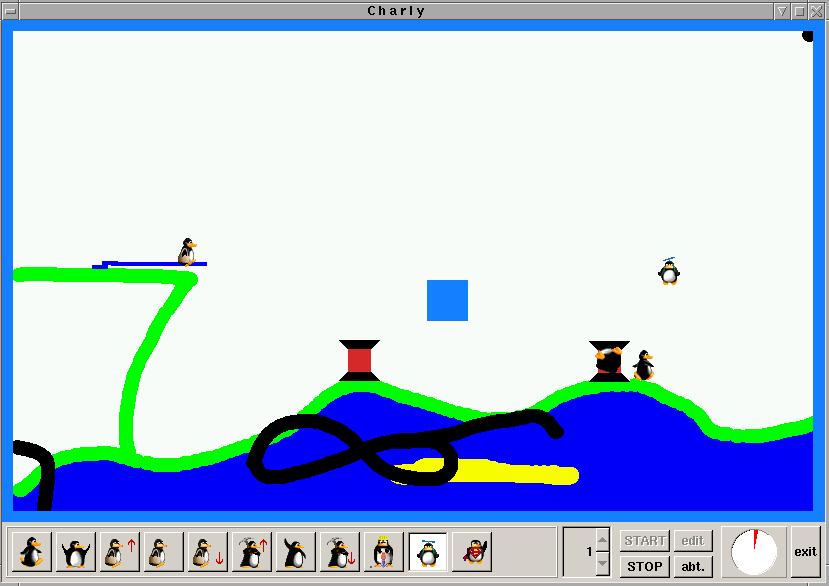
See here for a screenshot. Note the black dot in the upper right corner. It means "iron", the color that marks an inpenetrable obstacle; miners and diggers will stop whenever they hit this color.
Downloads:
Charly requires the FOX Toolkit, which you find here. It was developped with Fox-1.2 but lately I only use the developper version Fox-1.7 (at the time of writing it is 1.7.67) with which it will compile well. This is the source codeHow to Play:
When starting Charly for the first time a second window will pop up where you have to choose the language, the background picture (it must be drawn before, please read the notes below), etc. These informations have to be prepared for every level (by clicking to the edit button). Later on the game will always load the first picture.
Next you have to place an exit somewhere in the picture. Do it by pressing the left mouse button. After releasing it the exit will be marked blue. In a similar way you may place the two beamers by using the right mouse button. A third right click will remove them again.
You have to steer the Charlies to the exit where they will vanish (i.e. you saved them). The exit is always drawn into the background, it may be completely hidden and the player has to find and to dig it free first.
Now press the START button. The Charlies always enter the scene form the top left corner. All that remains to do is to select tasks that you can apply to the walking Charlies by clicking to them.
| Faller |  |
Charlies always fall when they have no ground under their feet. This task is started and stopped automatically and you cannot click to fallers while in the air |
| Walker | |
Charlies usually walk. But sometimes it is useful to turn them back to walkers, e.g. before they drill a hole too deep. A click with the right mouse botton turns every Charly into a walker |
| Stopper |  |
Stoppers block the way for following Charlies. |
| Bridger |  |
A bridger builds little steps. He only stops when bumping into an obstacle. There are three kinds of bridgers (as indicated by the little arrows): they can build the steps upward, even or downward. |
| Miner |  |
Whenever a Charly is in front of a hill, it can be turned into a miner who will remove the ground. There are two kinds of miners (as indicated by the little arrows): they can dig in a slope upwards or downwards. |
| Basher |  |
Bashers are similar to miners. They remove the ground, but they dig horizontally. |
| Digger |  |
Like miners or bashers diggers remove ground, however, they dig straight to the bottom. |
| Helicopter |  |
Helicoptercharlies lift off and fly a strange course which was inspired by chess' knights. |
| Supercharly |  |
Supercharlies lift off and fly away until they hit an obstacle. A click with the middle mouse botton also turns any Charly into a supercharly |
If you rightklick the START button when the game is over only the image will be reloaded. In this way it is possible to relocate the exit or edit the level.
Backgroundpictures
Charly supports only BMP and colored PPM formats (GIFs and JPGs are not suitable because these formats reduce the file size by interpolating colors). Drawings can have any size, many colors, any contents, BUT:
- the size of the picture influences the speed of the game i.e. on slow machines it should not be too large
- use thick lines (at least 6 pixels wide)
- the top left pixel defines the background color (the one color that is not an obstacle, it may not be white)
- if different from the background color the top right pixel defines the "iron" color (an inpenetrable obstacle, miners and diggers will stop there)
- the entrance for the Charlies (a quadrangle about 70x70 pixel wide in the upper left corner) must remain empty
- use only colors that are clearly distinguishable from the background color, the computer sees the smallest differences
On Linux "xpaint" and on Windows "paint" are good choices for drawing programs.
For a quick start here are two sample pictures: A ppm file (the one from the screenshot) and a bmp picture . Neither of them is close to being art, but they were useful for me when testing the program. Note that in both pictures there is a black dot in the upper right corner i.e. the black lines are made of "iron".

Flaws, Things to Improve
We tested the game and it no longer crashed (it took some time...) Nevertheless, sometimes there are surprises and it is more or less difficult to change this. Maybe I'm going to improve the game some day :-)- Charlies might get struck in the background (especially bridgers when hitting "iron")
- If you turn a Charly into a stopper, other walkers close by get caught
- ...
If you have any questions or comments just mail me.